Opening and Writing SWxSOC Affiliated Data
Overview
The SWXData class provides a convenient and efficient way to work with SWxSOC affiliated mission science CDF data files.
The point of this class is to simplify data management, enhance data discovery, and facilitate adherence to CDF standards.
CDF (Common Data Format) files are a binary file format commonly used by NASA scientific research to store and exchange data. They provide a flexible structure for organizing and representing multidimensional datasets along with associated metadata. CDF files are widely used in space physics. Because of their versatility, CDF files can be complex. CDF standards exist to make it easier to work with these files. International Solar-Terrestrial Physics (ISTP) compliance is a set of standards defined by the Space Physics Data Facility (SPDF). ISTP compliance ensures that the data adheres to specific formatting requirements, quality control measures, and documentation standards. Uploading CDF files to the NASA SPDF archive requires conforming to the ISTP guidelines.
The CDF C library must be properly installed in order to use this package to save and load CDF files. The CDF library can be downloaded from the SPDF CDF Page to use the CDF libraries in your local environment. Alternatively, the CDF library is installed and available through the development Docker container environment. For more information on the Docker container please see our Development Environment Page.
To make it easier to work with SWxSOC affiliated mission data, the SWXData class facilitates the abstraction of CDF files.
It allows users to read and write instrument data and is compliant with PyHC expectations.
Data is stored in a combination of TimeSeries, NDData, and NDCollection objects.
Metadata is stored in dictionaries, with a dataset level dict for global metadata, and variable-level dict`s for variable attributes.
By loading the contents of a CDF file into these data structures, it becomes easier to manipulate, analyze, and visualize the data.
Additionally, metadata attributes associated with the table allow for enhanced documentation and data discovery.
The :py:class:`~swxsoc.swxdata.SWXData class aims to provide a simplified interface to reading and writing data and metadata to CDF files while automatically handling the complexities of the underlying CDF file format.
Creating a SWXData object
Creating a SWXData data container from scratch involves four
pieces of data:
timeseries(required) - anTimeSeriesordict[str : ~astropy.timeseries.TimeSeries]containing one or more time variables, and any other time-varying scalar measurements. Time-varying measurements should appear in the table as columns with their associates time variable as the first column.
support(optional) - adict[astropy.nddata.NDdata | astropy.units.Quantity]containing oneor more non-time-varying (time invariant) measurements, time-invariant support or metadata variables.
spectra(optional) - anNDCollectioncontaining one or moreNDCubeobjectsrepresenting higher-dimensional measurements and spectral data. This data must should be used for all vector or tensor-based measurement data.
meta(optional) - adictcontaining global metadata information about the CDF. This datastructure must be used for all global metadata required for ISTP compliance.
Alternatively, a SWXData data container can be loaded from
an existing CDF file using the load() function.
Creating TimeSeries for SWXData timeseries
A SWXData must be initialized by providing one or more TimeSeries object with at least one measurement.
There are many ways to initialize one but here is one example:
>>> import numpy as np
>>> import astropy.units as u
>>> from astropy.timeseries import TimeSeries
>>> example_ts = TimeSeries(
...     time_start='2016-03-22T12:30:31',
...     time_delta=3 * u.s,
...     data={'Bx': u.Quantity(
...         value=[1, 2, 3, 4],
...         unit='nanoTesla',
...         dtype=np.uint16
...     )}
... )
Be mindful to set the right number of bits per measurement, in this case 16 bits.
If you do not, it will likely default to float64 and if you write a CDF file, it will be larger
than expected or needed. The valid dtype choices are uint8, uint16, uint32, uint64,
int8, int16, int32, int64, float16, float32, float64, float164. You can also create your time
array directly
>>> from astropy.time import Time, TimeDelta
>>> import astropy.units as u
>>> from astropy.timeseries import TimeSeries
>>> times = Time('2010-01-01 00:00:00', scale='utc') + TimeDelta(np.arange(100) * u.s)
>>> ts_2 = TimeSeries(
...     time=times,
...     data={'diff_e_flux': u.Quantity(
...         value=np.arange(100) * 1e-3,
...         unit='1/(cm**2 * s * eV * steradian)',
...         dtype=np.float32
...     )}
... )
Note the use of time and astropy.units which provide several advantages over using arrays of numbers and are required by SWXData.
For collections that have multiple Epochs, you can create a dictionary of TimeSeries objects.
>>> from astropy.time import Time, TimeDelta
>>> import astropy.units as u
>>> from astropy.timeseries import TimeSeries
>>> import numpy as np
>>> # Collected at one-second cadence
>>> primary_epoch = Time('2010-01-01 00:00:00', scale='utc') + TimeDelta(np.arange(100) * u.s)
>>> # Collected at 10-second cadence
>>> secondary_epoch = Time('2010-01-01 00:00:00', scale='utc') + TimeDelta(np.arange(10) * (10*u.s))
>>> ts_3 = {
...     'Epoch': TimeSeries(
...         time=primary_epoch,
...         data={'diff_e_flux': u.Quantity(
...             value=np.arange(100) * 1e-3,
...             unit='1/(cm**2 * s * eV * steradian)',
...             dtype=np.float32
...         )}
...     ),
...     'Epoch_state': TimeSeries(
...         time=secondary_epoch,
...         data={'counts': u.Quantity(
...             value=np.arange(10),
...             unit='Celsius',
...             dtype=np.float32
...         )}
...     )
... }
This allows you to have multiple time series in one SWXData object.
Creating a NDCollection for SWXData spectra
The SWXData object leverages API functionality of the
ndcube package to enable easier analysis of higher-dimensional and spectral data measurements.
The main advantage that this package provides in in it’s handling of coordinate transformations
and slicing in real-world-coordinates compared to using index-based slicing for higher-dimensional
data. For more information about the ndcube package and its API functionality please read the
SunPy NDCube documentation.
You can create a NDCollection object using an approach similar to the following example:
>>> import numpy as np
>>> from astropy.wcs import WCS
>>> from ndcube import NDCube, NDCollection
>>> example_spectra = NDCollection(
...     [
...         (
...             "example_spectra",
...             NDCube(
...                 data=np.random.random(size=(4, 10)),
...                 wcs=WCS(naxis=2),
...                 meta={"CATDESC": "Example Spectra Variable"},
...                 unit="eV",
...             ),
...         )
...     ]
... )
The NDCollection is created using a list of tuple containing named
(str, NDCube) pairs. Each NDCube contains the required data array, a
WCS object responsible for the coordinate transformations, optional
metadata attributes as a dict, and an units unit that is used to treat the data
array as an Quantity.
Creating a dict for SWXData support
The SWXData object also accepts additional arbitrary data
arrays, so-called non-record-varying (NRV) data, which is frequently support data. These data are
required to be a dict of NDData or
Quantity objects which are data containers for physical data.
The SWXData class supports both Quantity and NDData
objects since one may have advantages for the type of data being represented: Quantity
objects in this support dict may be more advantageous for scalar or 1D-vector data while
NDData objects in this support dict may be more advantageous for higher-dimensional vector
data. A guide to the nddata package is available in the
astropy documentation.
>>> from astropy.nddata import NDData
>>> const_param = u.Quantity(value=[1e-3], unit="keV", dtype=np.uint16)
>>> const_param.meta = {"CATDESC": "Constant Parameter", "VAR_TYPE": "support_data"}
>>> data_mask = NDData(data=np.eye(100, 100, dtype=np.uint16))
>>> data_mask.meta = {"CATDESC": "Data Mask", "VAR_TYPE": "support_data"}
>>> example_support_data = {
...     "const_param": const_param,
...     "data_mask": data_mask
... }
Metadata passed in through the NDData object is used by
SWXData as variable metadata attributes required for ISTP
compliance.
Creating a dict for SWXData meta
You must create a dict or OrderedDict containing the required CDF global metadata.
The class function global_attribute_template() will
provide you an empty version that you can fill in. Here is an example with filled in values.
>>> input_attrs = {
...     "DOI": "https://doi.org/<PREFIX>/<SUFFIX>",
...     "Data_level": "L1>Level 1",  # NOT AN ISTP ATTR
...     "Data_version": "0.0.1",
...     "Descriptor": "EEA>Electron Electrostatic Analyzer",
...     "Data_product_descriptor": "odpd",
...     "HTTP_LINK": [
...         "https://spdf.gsfc.nasa.gov/istp_guide/istp_guide.html",
...         "https://spdf.gsfc.nasa.gov/istp_guide/gattributes.html",
...         "https://spdf.gsfc.nasa.gov/istp_guide/vattributes.html"
...     ],
...     "Instrument_mode": "default",  # NOT AN ISTP ATTR
...     "Instrument_type": "Electric Fields (space)",
...     "LINK_TEXT": [
...         "ISTP Guide",
...         "Global Attrs",
...         "Variable Attrs"
...     ],
...     "LINK_TITLE": [
...         "ISTP Guide",
...         "Global Attrs",
...         "Variable Attrs"
...     ],
...     "MODS": [
...         "v0.0.0 - Original version.",
...         "v1.0.0 - Include trajectory vectors and optics state.",
...         "v1.1.0 - Update metadata: counts -> flux.",
...         "v1.2.0 - Added flux error.",
...         "v1.3.0 - Trajectory vector errors are now deltas."
...     ],
...     "PI_affiliation": "HERMES",
...     "PI_name": "HERMES SOC",
...     "TEXT": "Valid Test Case",
... }
Here is an example using the global_attribute_template()
function to create a minimal subset of global metadata attributes:
>>> from swxsoc.swxdata import SWXData
>>> input_attrs = SWXData.global_attribute_template("eea", "l1", "1.0.0")
Using Defined Elements to create a SWXData Data Container
Putting it all together here is instantiation of a SWXData
object:
>>> from swxsoc.swxdata import SWXData
>>> example_sw_data = SWXData(
...     timeseries=example_ts,
...     support=example_support_data,
...     spectra=example_spectra,
...     meta=input_attrs
... )
For a complete example with instantiation of all objects in one code example:
>>> import numpy as np
>>> from astropy.time import Time, TimeDelta
>>> import astropy.units as u
>>> from astropy.timeseries import TimeSeries
>>> from ndcube import NDCube, NDCollection
>>> from astropy.nddata import NDData
>>> from swxsoc.swxdata import SWXData
>>> # Collected at one-second cadence
>>> primary_epoch = Time('2010-01-01 00:00:00', scale='utc') + TimeDelta(np.arange(100) * u.s)
>>> # Collected at 10-second cadence
>>> secondary_epoch = Time('2010-01-01 00:00:00', scale='utc') + TimeDelta(np.arange(10) * (10*u.s))
>>> # Create a TimeSeries structure
>>> ts = {
...     'Epoch': TimeSeries(
...         time=primary_epoch,
...         data={'diff_e_flux': u.Quantity(
...             value=np.arange(100) * 1e-3,
...             unit='1/(cm**2 * s * eV * steradian)',
...             dtype=np.float32
...         )}
...     ),
...     'Epoch_state': TimeSeries(
...         time=secondary_epoch,
...         data={'counts': u.Quantity(
...             value=np.arange(10),
...             unit='Celsius',
...             dtype=np.float32
...         )}
...     )
... }
>>> # Create a Support Structure
>>> support_data = {
...     "data_mask": NDData(
...         data=np.eye(10, 10, dtype=np.uint16),
...         meta={"CATDESC": "Data Mask", "VAR_TYPE": "support_data"}
...     ),
... }
>>> # Create a Spectra structure
>>> spectra = NDCollection(
...     [
...         (
...             "example_spectra",
...             NDCube(
...                 data=np.random.random(size=(10, 10)),
...                 wcs=WCS(naxis=2),
...                 meta={"CATDESC": "Example Spectra Variable"},
...                 unit="eV",
...             ),
...         )
...     ]
... )
>>> # Create a Support Structure
>>> support_data = {
...     "data_mask": NDData(data=np.eye(100, 100, dtype=np.uint16))
... }
>>> # Create Global Metadata Attributes
>>> input_attrs = SWXData.global_attribute_template("eea", "l1", "1.0.0")
>>> # Create SWXData Object
>>> sw_data = SWXData(
...     timeseries=ts,
...     support=support_data,
...     spectra=spectra,
...     meta=input_attrs
... )
The SWXData is mutable so you can edit it, add another measurement column or edit the metadata after the fact.
Your variable metadata can be found by querying the measurement column directly.
>>> example_sw_data.timeseries['Bx'].meta.update(
...     {"CATDESC": "X component of the Magnetic field measured by HERMES"}
... )
>>> example_sw_data.timeseries['Bx'].meta
For multiple epoch variables, you have to addess measurements through the timeseries dictionary, keyed by the epoch name:
>>> sw_data.timeseries['Epoch']['diff_e_flux'].meta.update(
...     {"CATDESC": "Differential Electron Flux measured by HERMES"}
... )
>>> sw_data.timeseries['Epoch']['diff_e_flux'].meta
The class does its best to fill in metadata fields if it can and leaves others blank that it cannot. Those should be filled in manually. Be careful when editing metadata that was automatically generated as you might make the resulting CDF file non-compliant.
Creating a SWXData from an existing CDF File
Given a current CDF File you can load it into a SWXData by providing a Path to the CDF file:
>>> from pathlib import Path
>>> from swxsoc.swxdata import SWXData
>>> data_path = Path("hermes_eea_default_ql_20240406T120621_v0.0.1.cdf")
>>> sw_data = SWXData.load(data_path)
The SWXData can the be updated, measurements added, metadata added, and written to a new CDF file.
Adding data to a SWXData Container
A new set of measurements or support data can be added to an existing instance. Remember that new measurements must have the same time stamps as the existing ones and therefore the same number of entries. Support data can be added as needed. You can add the new measurements in one of two ways.
The more explicit approach is to use add_measurement() function:
>>> data = u.Quantity(np.arange(len(example_sw_data.timeseries['Bx'])), 'Gauss', dtype=np.uint16)
>>> example_sw_data.add_measurement(
...     measure_name="By",
...     data=data,
...     meta={"CATDESC": "Y component of the Magnetic field measured by HERMES"}
... )
To add non-time-varying support data use the add_support() function:
>>> sw_data.add_support(
...     name="Calibration_const",
...     data=u.Quantity(value=[1e-1], unit="keV", dtype=np.uint16),
...     meta={"CATDESC": "Calibration Factor", "VAR_TYPE": "support_data"},
... )
>>> sw_data.add_support(
...     name="Data Mask",
...     data=NDData(data=np.eye(5, 5, dtype=np.uint16)),
...     meta={"CATDESC": "Diagonal Data Mask", "VAR_TYPE": "support_data"},
... )
Adding metadata attributes
Additional CDF file global metadata and variable metadata can be easily added to a
SWXData data container. For more information about the required
metadata attributes please see the CDF Format Guide
Global Metadata Attributes
Global metadata attributes can be updated for a SWXData object
using the object’s meta parameter which is an
OrderedDict containing all attributes.
Required Global Attributes
The SWXData class requires several global metadata attributes
to be provided upon instantiation:
DescriptorData_levelData_version
A SWXData container cannot be created without supplying at
lest this subset of global metadata attributes. For assistance in defining required global
attributes, please see the global_attribute_template()
function.
Derived Global Attributes
The SWXSchema class derives several global metadata
attributes required for ISTP compliance. The following global attributes are derived:
CDF_Lib_versionData_typeGeneration_dateswxsoc_versionLogical_file_idLogical_sourceLogical_source_description
For more information about each of these attributes please see the CDF Format Guide
Using a Template for Global Metadata Attributes
A template of the required metadata can be obtained using the
global_attribute_template() function:
>>> from collections import OrderedDict
>>> from swxsoc.swxdata import SWXData
>>> SWXData.global_attribute_template()
OrderedDict([('Data_level', None),
         ('Data_version', None),
         ('Descriptor', None),
         ('Discipline', None),
         ('Instrument_type', None),
         ('Mission_group', None),
         ('PI_affiliation', None),
         ('PI_name', None),
         ('Project', None),
         ('Source_name', None),
         ('TEXT', None)])
You can also pass arguments into the function to get a partially populated template:
>>> from collections import OrderedDict
>>> from swxsoc.swxdata import SWXData
>>> SWXData.global_attribute_template(
...     instr_name='eea',
...     data_level='l1',
...     version='0.1.0'
... )
OrderedDict([('Data_level', 'L1>Level 1'),
         ('Data_version', '0.1.0'),
         ('Descriptor', 'EEA>Electron Electrostatic Analyzer'),
         ('Discipline', None),
         ('Instrument_type', None),
         ('Mission_group', None),
         ('PI_affiliation', None),
         ('PI_name', None),
         ('Project', None),
         ('Source_name', None),
         ('TEXT', None)])
This can make the definition of global metadata easier since instrument teams or users only need
to supply pieces of metadata that are in this template. Additional metadata items can be added
if desired. Once the template is instantiated and all attributes have been filled out, you can
use this during instantiation of your SWXData container.
Variable Metadata Attributes
Variable metadata requirements can be updated for a SWXData
variable using the variable’s meta property which is an
OrderedDict of all attributes.
Required Variable Attributes
The SWXData class requires one variable metadata attribute
to be provided upon instantiation:
CATDESC: (Catalogue Description) This is a human readable description of the data variable.
Derived Variable Attributes
The SWXSchema class derives several variable metadata
attributes required for ISTP compliance.
DEPEND_0DISPLAY_TYPEFIELDNAMFILLVALFORMATLABLAXISSI_CONVERSIONUNITSVALIDMINVALIDMAXVAR_TYPE
For more information about each of these attributes please see the CDF Format Guide
Using a Template for Variable Metadata Attributes
A template of the required metadata can be obtained using the
measurement_attribute_template() function:
>>> from collections import OrderedDict
>>> from swxsoc.swxdata import SWXData
>>> SWXData.measurement_attribute_template()
OrderedDict([('CATDESC', None)])
If you use the add_measurement() function, it will
automatically fill most of them in for you. Additional pieces of metadata can be added if desired.
Visualizing data in a SWXData Container
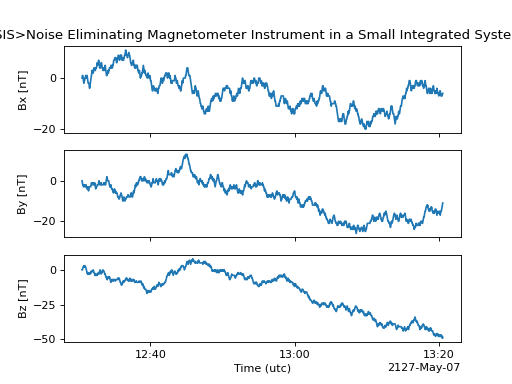
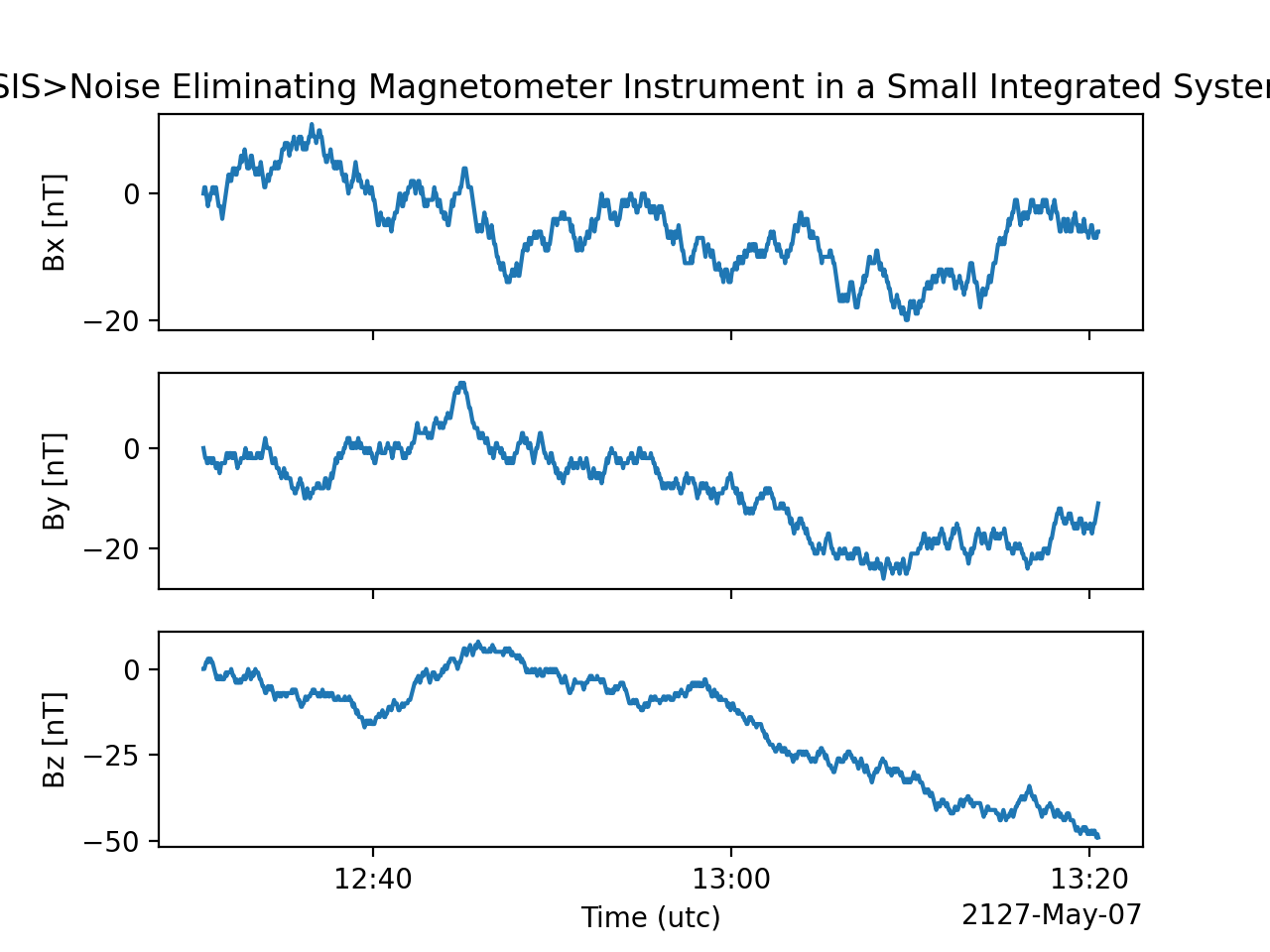
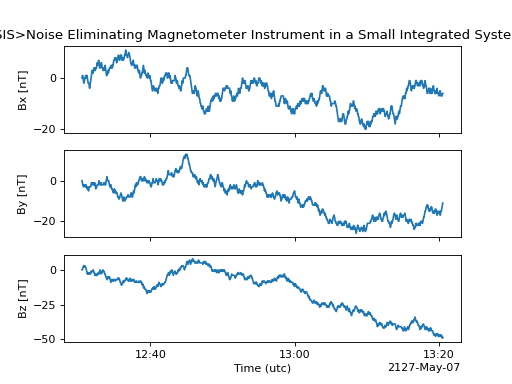
The SWXData provides a quick way to visualize its data through plot.
By default, a plot will be generated with each measurement in its own plot panel.
>>> import numpy as np
>>> import matplotlib.pyplot as plt
>>> import astropy.units as u
>>> from astropy.timeseries import TimeSeries
>>> from swxsoc.swxdata import SWXData
>>> bx = np.concatenate([[0], np.random.choice(a=[-1, 0, 1], size=1000)]).cumsum(0)
>>> by = np.concatenate([[0], np.random.choice(a=[-1, 0, 1], size=1000)]).cumsum(0)
>>> bz = np.concatenate([[0], np.random.choice(a=[-1, 0, 1], size=1000)]).cumsum(0)
>>> ts = TimeSeries(time_start="2016-03-22T12:30:31", time_delta=3 * u.s, data={"Bx": u.Quantity(bx, "nanoTesla", dtype=np.int16)})
>>> input_attrs = SWXData.global_attribute_template("nemisis", "l1", "1.0.0")
>>> sw_data = SWXData(timeseries=ts, meta=input_attrs)
>>> sw_data.add_measurement(measure_name=f"By", data=u.Quantity(by, 'nanoTesla', dtype=np.int16))
>>> sw_data.add_measurement(measure_name=f"Bz", data=u.Quantity(bz, 'nanoTesla', dtype=np.int16))
>>> fig = plt.figure()
>>> sw_data.plot()
>>> plt.show()
(Source code, png, hires.png, pdf)
Writing a CDF File
The SWXData class writes CDF files using the pycdf module.
This can be done using the save() method which only requires a Path to the folder where the CDF file should be saved.
If no path is provided it writes the file to the current directory.
This function returns the full Path to the CDF file that was generated.
From this you can validate and distribute your CDF file.
Validating a CDF File
The SWXData uses the istp module for CDF validation, in addition to custom
tests for additional metadata. A CDF file can be validated using the validate() method
and by passing, as a parameter, the full Path to the CDF file to be validated:
>>> from swxsoc.util.validation import validate
>>> validation_errors = validate(cdf_file_path)
This returns a list[str] that contains any validation errors that were encountered when examining the CDF file.
If no validation errors were found the method will return an empty list.